|
General
|
Previous Top Next |
|
|
|
|
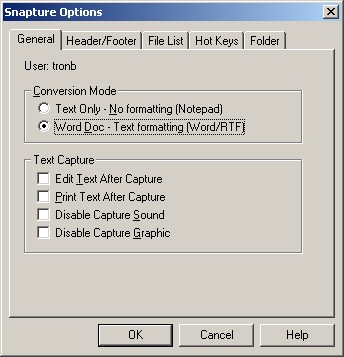
| Text Only - Only text will be captured. Formatting and pictures will be removed. The file appear as a text file on your computer and can be read by Notepad or any other text reader.
|
| Word Doc - Formatting and occassionally pictures will be stored in a .DOC file which which can be read by any word processor. Snaptures from MS Word files work great, while snaptures from browsers don't always get the pictures, but the text formatting is kept.
|
|
|
| · | Edit Text After Capture - Gives you a notepad after Snapturing text. The first line will be the memo title or doc name.
|
| · | Print Text After Capture - This will automatically print your "snaptured" text to your default printer. Your text editor for .TXT or the word processor for .DOC must support the '/p' option. Notepad and Microsoft Word support this option.
|
| · | Disable Capture Sound - Suppresses the Snap sound when capturing text. Replace the CAPTURE.WAV file to change the sound.
|
| · | Disable Capture Graphic - Supresses the Snap logo when capturing text.
|
|
|